

Want your Shopify products to rank higher and convert more visitors? Writing effective SEO product descriptions is the key. Here's how you can create descriptions that attract search traffic and persuade shoppers to buy:
- Focus on Keywords: Identify a primary keyword for each product and a few related terms. Use tools like Google Keyword Planner to find phrases with good search volume and low competition.
- Write Engaging Titles: Start titles with your main keyword, followed by a unique feature and your brand name. Keep it clear and under 60 characters.
- Turn Features into Benefits: Explain why each feature matters to the customer. For example, "Breathable cotton keeps you cool on hot summer days."
- Use Long-Tail Keywords: Target specific phrases like "non-slip yoga mat for sweaty hands" to attract highly interested buyers.
- Structure for Readability: Use short paragraphs, bullet points, and clear headings to make descriptions easy to skim.
- Optimize Meta Descriptions and Alt Text: Write concise meta descriptions (120–160 characters) with a call-to-action, and use descriptive alt text for images.
- Avoid Duplicate Content: Create unique descriptions for each product to prevent internal competition and improve rankings.
- Add Product Schema Markup: Use structured data to display rich snippets like price, availability, and reviews in search results.
These strategies help both search engines and shoppers understand your products better, driving more traffic and sales. Ready to dive deeper? Let’s break it down step by step.
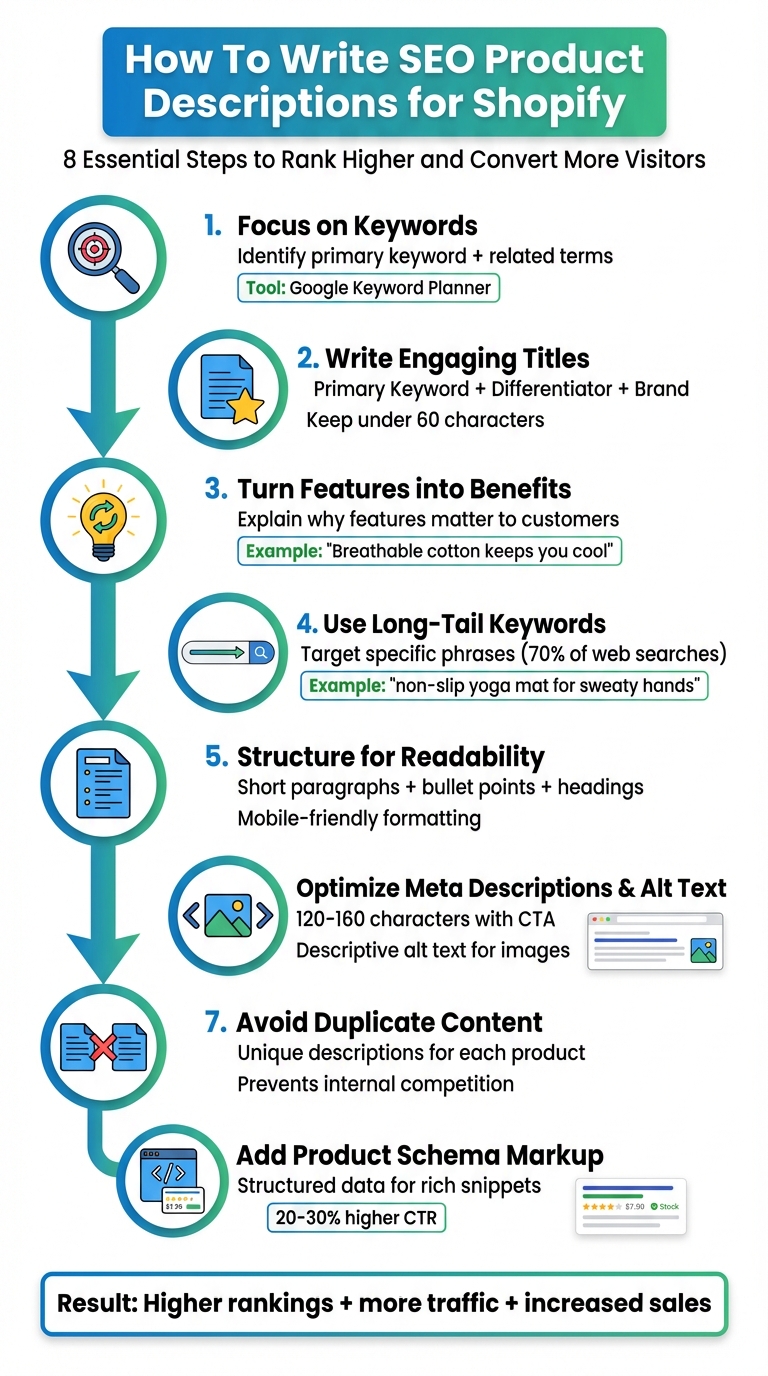
8-Step Process for Writing SEO Product Descriptions on Shopify
High Converting Product Descriptions for Shopify: How to Write Product Descriptions for SEO
Identify Your Target Keywords
Keyword research is the backbone of any SEO-friendly product description. If you don’t know what U.S. customers are searching for, you’re left to guess - and guessing doesn’t sell products. The objective is to pinpoint one primary keyword for each product (the main term you want to rank for) and a few supporting keywords (related terms that provide context and help capture more search variations).
Start by thinking about how a shopper might naturally describe your product. Consider elements like material, size, color, purpose, and price (in U.S. dollars). For example, brainstorm phrases like "soy candles under $30" or "non-toxic candles for bedroom." Aim for a list of 10–15 potential search terms.
Next, plug these terms into Google Keyword Planner (available for free with a Google Ads account). Set your location to the United States and language to English. Review the results, prioritizing phrases with good search traffic and manageable competition. If you’re running a smaller Shopify store, focus on medium-to-high relevance keywords with low-to-medium competition rather than chasing highly competitive terms like "candle." Don’t forget to explore Google’s autocomplete suggestions, as well as the "People also ask" and "Related searches" sections. These areas often reveal real-world queries like "best soy candles for gifts" or "clean-burning candles made in the USA."
Conduct Keyword Research
Here’s how to zero in on the right primary keyword:
- Define your product: Note its category, material, purpose, price (in USD), and target audience.
- Brainstorm seed terms: Think of phrases a customer might search for naturally.
- Leverage keyword tools: Use tools like Google Keyword Planner to find related terms and their search volume.
- Validate search intent: Check how well your top keyword candidates align with user intent by reviewing Google's "People also ask" and "Related searches."
- Compare volume and competition: Choose a primary keyword with good traffic potential and lower competition.
- Assign one keyword per product: This avoids competing with your own pages for the same term.
For instance, if you’re selling women’s waterproof hiking boots, you might find that "women's waterproof hiking boots" has 2,400 monthly U.S. searches with medium competition, while "waterproof hiking boots for women" has 1,600 searches and lower difficulty. Based on this, you’d select the term that offers the best mix of relevance, traffic, and ranking potential. Then, identify 5–10 supporting keywords like "lightweight hiking boots for women", "trail-ready boots", or "boots with ankle support" to naturally weave into your description. Keep everything organized in a spreadsheet with columns for product name, URL, primary keyword, supporting keywords, search volume, and notes. This system ensures consistency as your product catalog grows.
Focus on Long-Tail Keywords
Long-tail keywords are extended, more specific phrases like "organic cotton baby swaddle for newborns" or "non-slip yoga mat for sweaty hands." Unlike broad terms such as "baby blanket" or "yoga mat", long-tail keywords account for about 70% of all web searches and often convert better. Why? Because they show clearer intent - someone searching "women's black leather ankle boots size 8" is much closer to making a purchase than someone simply typing "boots."
Another advantage of long-tail keywords is reduced competition, which gives smaller Shopify stores a better shot at ranking. These terms address niche needs, specific use cases, and unique problems (e.g., "running shoes for shin splints" or "soy candles with wooden wick"). To uncover profitable long-tail keywords, start with a base term in Google Keyword Planner, sort by relevance, and look for longer phrases (three or more words). Use Google’s "People also ask" and "Related searches" for question-based queries like "best soy candles for bedroom" or "soy candle gift set under $30." Additionally, review competitor product pages that rank well to spot recurring phrases in their titles and bullet points.
Only keep long-tail keywords that align closely with your product’s features - like price (in USD), materials, dimensions, origin, or eco-friendly benefits. This way, the traffic you attract is more likely to convert into buyers.
Once you’ve locked in your keywords, the next step is crafting product titles that rank effectively.
Write Product Titles That Rank Higher
On Shopify, product titles play a crucial role in SEO. Search engines prioritize words at the start of a title, meaning what you put first can directly influence your rankings. Once you've identified your target keywords, the next step is to craft titles that improve visibility while engaging potential customers.
The trick is to create titles that seamlessly combine your main keyword with clear, natural language. A well-written title not only attracts the right audience but also encourages conversions without sounding awkward or overloaded.
Use the Right Title Formula
One effective formula for Shopify product titles is: Primary Keyword + Key Differentiator + Brand Name. This structure ensures your most important keyword appears first, followed by a unique feature of the product, and then your brand name to reinforce trust.
For example, instead of a generic title like "Hiking Boots", you could use: "Waterproof Hiking Boots for Rough Terrain | Trailblazer". Or, instead of "Red Dress", try: "Elegant Red Evening Dress for Special Occasions | Monroe Studio". The "key differentiator" could highlight features like material, intended audience, size (using U.S. units), or a standout benefit - whatever resonates most with your customers and sets your product apart. This approach not only aligns with how search engines prioritize keywords but also helps shoppers quickly determine if the product meets their needs.
Balance Keywords with Readability
While keywords are essential, your titles need to feel natural and easy to read. Always write with your customers in mind first, and then optimize for search engines. Avoid cramming in too many keywords or unnecessary adjectives, as this can make titles feel cluttered and unappealing.
Keep your titles under 60 characters to ensure they display properly in search results and on mobile devices. Focus on including one primary keyword and, at most, one or two additional descriptive phrases. Use straightforward, conversational language that reflects how people search online. If your title quickly answers "What is it?" and "Who is it for?" you've likely hit the sweet spot between SEO and readability.
Up next, we'll dive into how product descriptions can enhance these optimized titles.
Write Product Descriptions That Convert
Once you've nailed an optimized title, the next step is crafting a product description that turns curiosity into action. A well-written description not only helps search engines understand your product but also persuades shoppers to hit "Add to Cart." The key? Focus on your audience first and search engines second. Your copy should address customer needs, tackle objections, and highlight the product's value - all while seamlessly incorporating relevant keywords.
Think of your product description as a conversation with someone who's intrigued but not yet sold. You're not just listing technical details; you're showing how the product fits into their life, solves a problem, or makes things easier. When you translate features into real-world benefits using clear, relatable language, your descriptions will resonate with shoppers and improve your search rankings. Start with a strong opening sentence that captures attention and integrates your main keyword naturally.
Start with a Strong Opening Sentence
The opening sentence is prime real estate. Search engines prioritize it, and shoppers decide within seconds whether to keep reading. Use this space wisely by leading with your primary keyword and immediately highlighting the product's key benefit.
For example, instead of a generic line like "Memory foam office chair in black", try this:
"This ergonomic memory foam office chair keeps you comfortable during long workdays with breathable cushioning and adjustable lumbar support."
Notice how the keyword is seamlessly included while addressing a common buyer concern - staying comfortable during work. A strong opener should tap into your audience's desires or solve a pain point, whether it's improving productivity, staying cool, or saving time. This sets the tone for both search engines and potential buyers.
Turn Features into Benefits
While features explain what a product is, benefits tell shoppers why it matters. A simple formula to follow is:
Feature → "which means" → Benefit.
For example:
- A stainless-steel blade stays sharp longer, which means you save money on replacements.
- 100% breathable cotton keeps you cool on hot summer days, which means you'll stay comfortable even during outdoor events.
To uncover the benefit behind each feature, ask yourself, "So what?" This approach helps you connect with what customers care about - whether that's comfort, durability, style, safety, or convenience. U.S. shoppers, in particular, value products that simplify life, save time, or offer great value. For instance, instead of listing "Double-wall insulated stainless steel bottle, 20 oz.", you could write:
"Keeps drinks ice-cold for up to 24 hours or piping hot for 12, so your coffee stays warm during your commute, and your water stays chilled through your gym session."
This paints a vivid picture of how the product fits into everyday life, making it more relatable and appealing. Once you've outlined features and benefits, it's time to weave in related keywords.
Add Related Keywords Naturally
After placing your primary keyword in the title and opening sentence, sprinkle related keywords and synonyms throughout the description. This strategy, often called semantic SEO, helps you rank for a wider range of search terms without sounding repetitive.
For example, if your primary keyword is "adjustable standing desk", you can include variations like "sit-stand desk", "height-adjustable desk", "ergonomic workstation", or "home office desk" in sentences like:
"Create your ideal sit-stand setup with this height-adjustable desk, perfect for any home office."
You can also use these variations in bullet points:
- Height-adjustable from 28″ to 48″ for personalized comfort.
- Designed as an ergonomic workstation to enhance productivity.
Avoid keyword stuffing or awkward phrasing - if a sentence feels clunky when read aloud, simplify it. The goal is to include additional search terms while keeping the copy engaging and easy for shoppers to read. By blending keywords naturally, you'll create descriptions that appeal to both search engines and potential buyers.
Format Descriptions for Better Results
Crafting keyword-rich content and engaging copy is just the start - how you format your descriptions plays a huge role in your SEO success. If visitors land on a page filled with unstructured text, they’re likely to leave quickly, which can hurt your search rankings.
To keep readers engaged and search engines happy, structure your descriptions using short paragraphs, bullet points, and clear headings. This format helps shoppers quickly locate key details like pricing, sizing, and benefits while reinforcing your page’s relevance for search engines. Whether someone is browsing on their phone or comparing items on a laptop, the goal is to make information easy to absorb in just seconds. Below, we’ll dive into practical formatting tips to improve readability and boost conversions.
Use Bullet Points for Clarity
After your opening paragraph, break down essential details into a scannable bullet list. This makes it easier for shoppers to find what they need and improves the overall readability of your page. Start each bullet with a clear benefit or feature label, followed by a brief explanation. Keep it short and to the point - focus on what matters most to U.S. shoppers, such as product benefits, materials, measurements (in inches or pounds), care instructions, and standout features.
For instance, a Shopify description for wireless earbuds might begin with a few sentences about sound quality and battery life, followed by a bullet list like this:
- Crystal-clear stereo sound – Enhanced drivers for music, calls, and podcasts.
- 24-hour battery life – 6 hours per charge, plus extra from the charging case.
- Customizable fit – Includes three ear tip sizes for a snug and secure feel.
- Sweat-resistant design – Perfect for workouts or outdoor activities.
This format naturally integrates related keywords like "wireless", "Bluetooth", and "battery life", helping your page rank for a broader range of searches while keeping the content easy to skim. Stick to four to seven bullets to avoid overwhelming readers.
Keep Descriptions Concise
Aim for 150–300 words per description. This range lets you highlight benefits, features, and address common concerns without overwhelming your audience. Use the first 40–60 words to identify who the product is for, highlight the primary benefit, and include your main keyword. Then, let bullet points handle technical details like materials, size, and warranty information.
Cut out filler phrases and stick to clear, everyday language. Use measurements familiar to U.S. shoppers - think inches, pounds, and degrees Fahrenheit - and keep pricing straightforward with formats like "Under $50." If you have additional technical details, such as spec tables or warranty terms, consider placing them in expandable “More details” sections or tabs to keep the main description clean. Analytics can help you refine your word count for optimal performance.
Use Heading Tags Correctly
On Shopify, the product title typically defaults to the H1 tag generated by your theme. Avoid adding extra H1 tags in your description. Instead, use H2 tags for major sections like "Product Details", "Benefits", or "Size & Fit", and H3 tags for subsections such as "Care Instructions" or "Shipping & Returns." This structure helps search engines understand your page and provides shoppers with clear visual anchors for quick navigation.
Don’t use heading tags purely for styling, like enlarging text with an H2 tag - this can confuse search engines and hurt your rankings. Keep headings natural and avoid keyword stuffing. For example, instead of "Cheap Red Dress | Red Dress | Buy Red Dress Online", go with something like "Why You'll Love This Red Dress", adding a keyword naturally. If you work with a Shopify-focused agency like Martin Monroe Creative (https://martinmonroecreative.com), they can ensure your theme’s code uses one H1 per product and consistent H2/H3 structures, enhancing both user experience and SEO.
These formatting tips create a solid foundation for further SEO optimizations.
sbb-itb-8b1a57a
Optimize Meta Descriptions and Alt Text
Once you've formatted your content, it's time to refine meta descriptions and alt text to improve both search visibility and user experience. While these elements don't directly influence rankings, they’re essential for drawing clicks and reinforcing your page's relevance. Think of a meta description as a mini ad - it entices users to choose your product. Meanwhile, descriptive alt text enhances image indexing and ensures accessibility for visually impaired users.
A compelling meta description can indirectly boost your click-through rate (CTR), signaling search engines that your page offers value. Similarly, keyword-rich alt text can increase your visibility in Google Images, which is a big deal for visual-heavy products like clothing or home décor. Let’s dive into how to write these effectively.
Write Effective Meta Descriptions
Aim for meta descriptions between 120–160 characters to ensure they display properly on both desktop and mobile search results. Start with your primary keyword - for example, "women's waterproof hiking boots" - and follow it with one or two benefits that appeal to U.S. shoppers, such as comfort, durability, or free shipping. Wrap it up with a clear call-to-action like "Shop now", "Order today", or "Explore our collection."
Focus on benefits and keep the tone conversational. Instead of simply repeating your product name, explain why clicking is worthwhile. For instance: "Stylish tan leather hiking boots with waterproof design and free U.S. shipping on orders over $50. Shop now for your next adventure!" This approach naturally incorporates your keyword, highlights value (free shipping threshold in USD), and encourages action - all within the character limit.Avoid overloading with keywords or using all caps, as these can come across as spammy and undermine trust.
Write Descriptive Alt Text for Images
Alt text should clearly describe the content of the image in simple, specific terms, typically in 5–15 words. Include details like the product type, key attributes (color, material), and context such as "front view", "close-up of stitching", or "lifestyle shot on model."Incorporate a relevant keyword only if it fits naturally. For example: "Tan leather waterproof hiking boots with rugged rubber sole" is concise, informative, and SEO-friendly without feeling forced.
Use unique alt text for each image on a product page. For example, describe different angles or features - like the back view, a close-up of a zipper, or the boots in action. Avoid generic labels like "image1" or "picture of", since screen readers already identify the element as an image. Thoughtful alt text not only supports SEO but also reinforces the keywords used across your product page. If managing a large inventory feels overwhelming, agencies like Martin Monroe Creative (https://martinmonroecreative.com) specialize in creating scalable alt-text patterns and meta-description templates for consistency across your catalog.
Avoid Duplicate Content
Once you've fine-tuned your meta descriptions and alt text, it's time to tackle another common SEO hurdle for Shopify stores: duplicate content. When product pages share identical or nearly identical descriptions, search engines struggle to decide which page to rank. This creates internal competition, where your own products end up competing against each other, ultimately hurting your store's visibility and performance in search results.
Crafting unique product descriptions isn’t just about avoiding SEO penalties - it’s a direct way to boost revenue. Original, benefit-driven copy keeps visitors engaged, lowers bounce rates, and quickly communicates why your product is the right choice for them. For U.S. shoppers juggling multiple tabs while comparing options, a tailored description that highlights specific scenarios - like a weekend camping trip, an office commute, or a thoughtful holiday gift - can make the difference between closing a sale or losing it to an abandoned cart. To fully grasp why uniqueness is key, let’s break down the risks of duplicate content.
Understand the Risks of Duplicate Content
Duplicate content can cause several issues for your store, including:
- Keyword cannibalization: Multiple pages competing for the same search terms dilute your rankings.
- Wasted crawl budget: Search engines spend unnecessary time indexing near-identical pages.
- Lower rankings: Confusion over which page best answers a query often results in none of them ranking well.
To identify duplicate content, you can export your Shopify product data and scan the description column for repeated text. Alternatively, search for a specific sentence from one of your descriptions in Google using quotation marks. Product families with minor variations - like different colors or sizes - are especially at risk. Shopify itself advises, “Create unique product descriptions for each product detail page (PDP)” as a core SEO practice.
Streamline Content Creation
Writing unique descriptions for a large catalog can feel overwhelming, but you don’t need to tackle everything at once. Start by focusing on your best-selling, high-margin, or strategically important products. For these, invest time in crafting detailed, original descriptions that highlight their unique benefits.
For lower-priority products, you can use a modular template with sections like "Who it's for", "Key benefits", "Specs", and "Care instructions." While the structure remains consistent, tailor each section with details specific to the product.
When dealing with similar products that differ only in size or color, use a shared base description but emphasize unique use cases or audiences. For instance, instead of repeatedly describing "waterproof hiking boots", you could specify "perfect for hot summer hikes in the Southwest" for one variant and "ideal for cold-weather trails in the Rockies" for another. This not only targets different long-tail keywords but also aligns with varied customer needs.
If scaling content creation feels daunting, consider partnering with a Shopify-focused agency like Martin Monroe Creative. They specialize in blending SEO copywriting with broader store optimization, ensuring your descriptions resonate with your brand voice and meet the expectations of your U.S. audience.
Add Schema Markup for Better Visibility
Once you've crafted detailed product descriptions, the next step is ensuring search engines can fully understand and display your products effectively. This is where Product schema markup comes into play. This structured data helps categorize key elements on your product pages, like name, price, availability, brand, SKU, and reviews. Adding this data to your Shopify product pages makes it easier for search engines to interpret your content, often resulting in rich snippets that showcase price, stock status, and review stars directly in search results.
Most Shopify themes already include basic JSON-LD Product schema in their templates, so you might not need to start from scratch. To check, navigate to Online Store → Themes → Edit code in your Shopify admin. Open your product template file (commonly named main-product.liquid or product.json) and search for "@type": "Product". If it’s there, your theme is already generating structured data. To confirm everything is set up correctly, use Google's Rich Results Test to analyze your product URLs for complete and error-free markup.
If you find missing fields or feel uncomfortable editing code, Shopify apps can simplify the process. These apps can automatically generate and maintain Product schema for your entire catalog. Ensure your schema includes the essentials: product name, description, image URL, SKU, brand, and an offers object with details like price (e.g., "49.99"), priceCurrency (use "USD" for U.S. stores), and availability (e.g., "https://schema.org/InStock" or "https://schema.org/OutOfStock"). If your store features customer reviews, include an aggregateRating object with ratingValue and reviewCount - but only if genuine reviews are visible on the page.
Add Product Schema Markup on Shopify
To implement or modify Product schema, you’ll need to map Shopify's Liquid variables to the required schema properties. Here's how:
-
Product Name: Use
{{ product.title }}. -
Description: Use
{{ product.description | strip_html | escape }}to remove HTML tags. -
Main Image: Generate the full URL with
{{ product.featured_image | img_url: 'master' | prepend: 'https:' }}. -
Price: Retrieve the numeric value using
{{ product.price | money_without_currency }}and pair it with"priceCurrency": "USD". -
Availability: Dynamically set this based on stock status. If
{{ product.available }}is true, use"https://schema.org/InStock". Otherwise, use"https://schema.org/OutOfStock".
For stores with large catalogs, multiple sales channels, or frequent pricing and stock updates, keeping schema synchronized can be tricky. In such cases, working with a Shopify-focused agency like Martin Monroe Creative can save time and reduce errors. They can audit your theme’s existing schema, integrate robust Product markup with your review apps, and ensure consistency across your Shopify store, Amazon listings, and custom landing pages. This ensures your store benefits from rich results and delivers a cohesive brand experience.
How Rich Snippets Improve Results
Rich snippets offer shoppers critical details - like price, availability, and reviews - right in the search results. For U.S. consumers, this transparency helps them quickly decide if a product fits their needs and budget. Studies show that rich snippets can boost organic click-through rates (CTR) by 20–30% on average compared to standard search results, especially when review stars are visible.
But it’s not just about more clicks - it’s about attracting the right ones. Shoppers who click on rich results already know key details like price and stock status, meaning they’re further along in their decision-making process. This often leads to higher conversion rates once they land on your store. Over time, better engagement signals to Google that your pages are relevant and useful, which could improve your rankings. While schema markup alone won’t guarantee top placements, it makes your listings more appealing and increases the chances of turning impressions into sales.
Conclusion
Creating SEO-friendly product descriptions is key to attracting the right audience and driving sales. Start by conducting thorough keyword research to uncover the long-tail phrases your U.S. customers are actively searching for. These specific phrases should naturally flow into your titles, opening lines, meta descriptions, and image alt text. This helps search engines understand your content while showing shoppers exactly what they’re looking for.
The way you structure your descriptions is just as important as the words you use. Keep your content easy to skim with short paragraphs, bullet points, and clear headings - especially for mobile users. Always highlight the benefits first, answering the shopper's main question: "What’s in it for me?" Avoid duplicate content by ensuring each product page has a unique description to improve rankings. Craft engaging meta descriptions (150–160 characters) that feature a keyword and a call to action, and include descriptive alt text for images to enhance click-through rates and visibility.
Don’t overlook product schema markup. Adding structured data for details like price (in USD), availability, and reviews can help your listings stand out with rich snippets. These snippets - complete with star ratings and details like "In stock • $49.99" - can increase organic click-through rates and build trust with potential buyers. Together, these strategies set the stage for broader success across your online store.
FAQs
What’s the best way to use long-tail keywords in Shopify product descriptions?
To make the most of long-tail keywords in your Shopify product descriptions, weave them naturally into your writing. Focus on phrases that align with what your customers are specifically searching for. Incorporate these keywords into product titles, bullet points, and detailed descriptions to boost your SEO and draw in more targeted shoppers.
Steer clear of keyword stuffing - it can hurt readability and turn away potential buyers. Instead, aim for clear and relevant descriptions that prioritize the user experience. Always keep your audience in mind, letting keywords blend smoothly into your content to complement your message without overpowering it.
How can I prevent duplicate content in my Shopify product descriptions?
When writing product descriptions for your Shopify store, aim to craft one-of-a-kind content for each item. Steer clear of simply reusing manufacturer descriptions. Instead, spotlight the product's distinct features, benefits, and details that set it apart.
Think about your target audience while writing. Show how the product addresses their specific needs or solves a problem they might have. Infusing your descriptions with your brand's unique voice not only boosts SEO but also makes shopping more enjoyable and engaging for your customers.
How does schema markup help boost my Shopify store's search rankings?
Adding schema markup to your Shopify store can boost your search visibility by giving search engines a clearer picture of your products and website. This structured data enables search engines to showcase rich snippets - like product prices, ratings, and availability - right in the search results.
These rich snippets make your listings stand out, grabbing attention and encouraging more clicks. Over time, this can lead to better rankings and increased traffic. By implementing schema markup, you help search engines understand your Shopify store more effectively, drawing in more potential customers.