

In e-commerce, your Google Ads copy is your first shot at grabbing attention - and it has to work fast. With limited space (30-character headlines and 90-character descriptions), your words must drive clicks and conversions. Why does this matter? 18% of e-commerce revenue comes from Google Ads, but while click-through rates rose by 7.49% in 2025, conversion rates dropped 9.28%. The challenge isn’t just getting clicks - it’s turning them into sales.
Here’s the key takeaway: sharp, benefit-focused copy that aligns with search intent can lower costs and improve results. Use these strategies:
- Write modular headlines and descriptions for Responsive Search Ads (RSAs), ensuring flexibility across 43,680 possible combinations.
- Include keywords in headlines to boost relevance and Quality Score.
- Highlight benefits, not just features, like free shipping or easy returns.
- Use ad extensions (assets) like sitelinks and callouts to increase visibility and click-through rates.
- Test and refine with A/B testing to find what resonates with your audience.
Your copy isn’t just about being clever - it’s about communicating value quickly and clearly to connect with your audience and maximize ad performance.
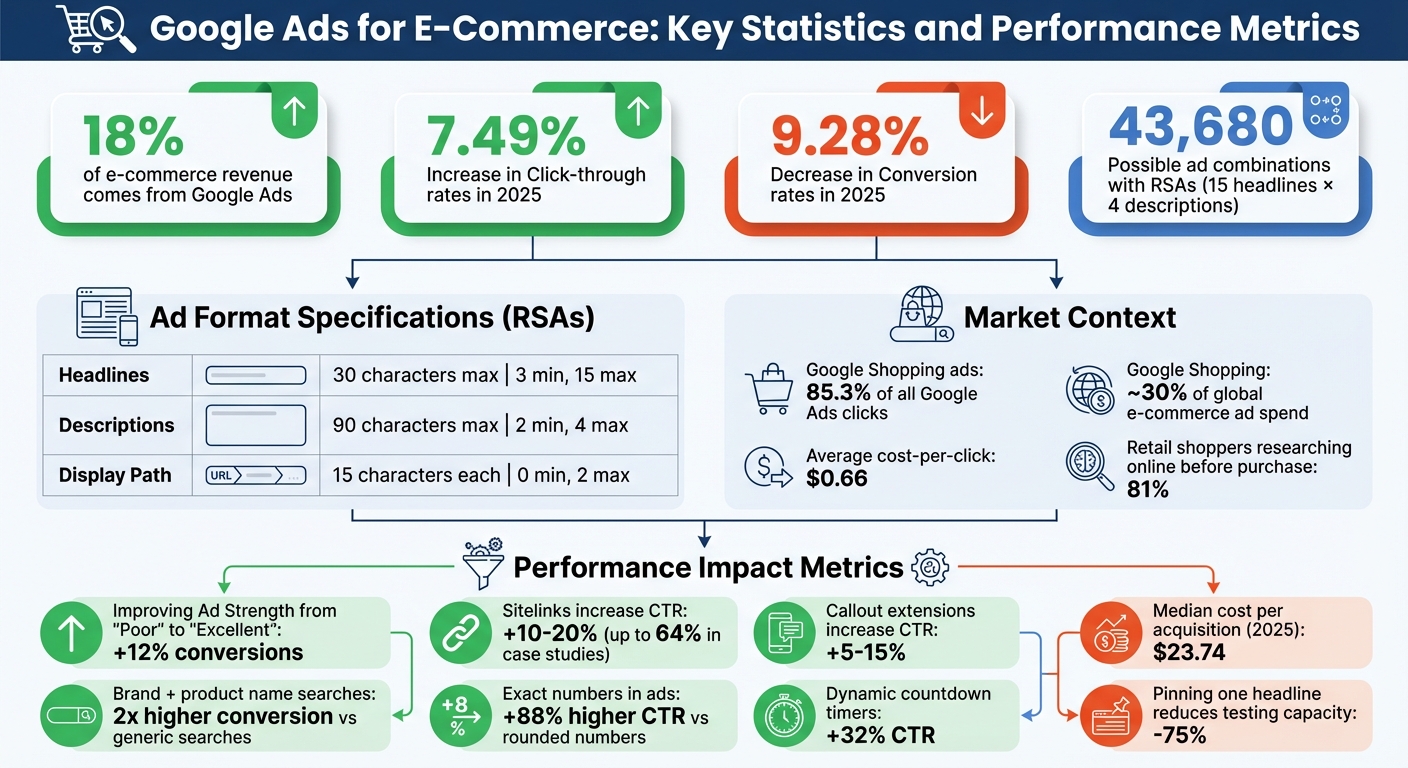
Google Ads for E-Commerce: Key Statistics and Performance Metrics 2025
Google Ads Basics for E-Commerce
Ad Format and Character Limits
Responsive Search Ads (RSAs) are now the go-to format for e-commerce campaigns on Google Ads. With RSAs, you can submit up to 15 headlines (each limited to 30 characters) and 4 descriptions (each up to 90 characters). Google’s AI then tests various combinations to find the best-performing match for each search query . Typically, up to 3 headlines and 2 descriptions are displayed at a time, but this can vary depending on the user’s device.
Here’s a mind-boggling fact: with 15 headlines and 4 descriptions, you’re creating up to 43,680 possible combinations. Because of this, each headline must be able to stand on its own. Avoid relying on sequences like “Part 1” or “Part 2” to ensure every combination makes sense.
| Ad Component | Character Limit | Minimum Required | Maximum Allowed |
|---|---|---|---|
| Headlines | 30 characters | 3 | 15 |
| Descriptions | 90 characters | 2 | 4 |
| Display Path (1 & 2) | 15 characters each | 0 | 2 |
To make the most of RSAs, focus on writing modular copy - headlines and descriptions that can work in any order. Avoid pinning specific headlines to fixed positions unless absolutely necessary (e.g., for legal reasons). Pinning even one headline reduces Google’s testing capacity by over 75% . Instead, aim for variety by using different headline lengths and emphasizing distinct value propositions rather than repeating keywords.
Mastering these mechanics is crucial to crafting ads that grab attention and drive clicks.
Why Ad Copy Matters for E-Commerce
Your ad copy is the crucial link between a user’s search and their decision to visit your store. Including the exact search terms in your headlines signals relevance immediately. This relevance doesn’t just boost click-through rates - it also enhances your Quality Score, helping you manage costs more effectively.
The stats back this up: advertisers who improve their Ad Strength from "Poor" to "Excellent" experience an average of 12% more conversions. Additionally, search terms that combine a brand and product name convert at least 2 times higher than generic category searches. This means your copy needs to align with where users are in their buying journey - whether they’re casually browsing or ready to make a purchase.
For e-commerce, your copy should emphasize what makes your offer stand out: free shipping, same-day delivery, easy returns, or exclusive products. These unique value propositions (UVPs) are what make users click on your ad instead of scrolling past. With the median cost per acquisition expected to hit $23.74 by 2025, crafting effective ad copy is key to staying profitable.
sbb-itb-8b1a57a
How to Write High-Converting Google Search Ad Copy (Step-by-Step)
Writing Ad Copy That Connects With Your Audience
When crafting ad copy for e-commerce, precision is key. Your goal is to connect with your audience by addressing their specific needs and interests.
How to Use Keywords Effectively
Start by placing your main keyword in the first headline to establish immediate relevance. Tools like Dynamic Keyword Insertion (DKI) can help tailor your ad text to match the keyword that triggered it. In the Google Ads editor, type a brace ("{}") to select "Keyword insertion", and set default text for cases where the keyword is too long. Use Title Case (e.g., {KeyWord:Default Text}) for headlines, and group keywords with a shared theme. For instance, if you're selling running shoes, group terms like "men's running shoes", "women's running shoes", and "trail running shoes" together for consistency.
Mix broad keywords with long-tail variations to attract both wide audiences and high-intent buyers. While "shoes" casts a wide net, a phrase like "best ergonomic chairs for back pain" targets shoppers ready to make a purchase.
For better results, ensure your ad keywords also feature prominently on your landing page. This alignment builds trust and reduces bounce rates. When using dynamic insertion, double-check grammar and compliance with ad policies. Avoid overused phrases like "best quality" or "satisfaction guaranteed." Instead, focus on specifics that resonate, such as "Free Shipping" or "Eco-Friendly Materials."
Finally, transform keyword relevance into compelling, benefit-driven headlines.
Writing Headlines That Focus on Benefits
Your headline is your first impression, so make it count. Highlight the outcome for the user rather than just listing features. For example, "File Taxes in Minutes" is far more engaging than "Tax Software."
In 2018, Canadian airline Swoop incorporated top-performing keywords into its responsive search ads, leading to a 71% revenue boost and 61% more conversions. This underscores the importance of aligning headlines with user searches.
Specific numbers can also make your headlines more credible. Ads featuring exact figures like "1,542 customers" often perform better - generating 88% higher click-through rates compared to rounded numbers like "1,500+ customers". Adding urgency with dynamic countdown timers, such as "Sale ends in 2 days", can further increase click-through rates by 32%.
Take advantage of the 15 headline slots by showcasing a variety of value propositions. For example, one headline might emphasize "Free Shipping", another "Hassle-Free Returns", and a third "Exclusive Products." This gives Google's AI more options to test and match with different user queries and intents.
Once your headlines grab attention, your descriptions need to back them up with strong, benefit-oriented details.
Writing Descriptions That Support Your Headlines
Descriptions, with their 90-character limit, should reinforce the promises made in your headlines while building credibility. Use this space to highlight social proof and include a clear call-to-action. For example, phrases like "Rated 4.9/5 by 500+ clients" or "Free shipping on orders over $50" can help establish trust.
Addressing potential customer concerns directly can also make a big difference. If people worry about returns, include something like "Cancel anytime with no penalty." If shipping costs are a sticking point, lead with "Free delivery on all orders." Every word should have a purpose.
Finally, match your call-to-action to the customer's stage in the buying journey. For casual browsers, "Shop Now" works well, while high-intent leads might respond better to "Get a Quote." Use action-driven language to create urgency, but keep it natural. Your descriptions should complement your headlines, providing the extra details users need to make a decision and take action.
Using Extensions and Assets to Improve Your Ads
Great ad copy gets attention, but adding extensions (now called "assets" by Google) can take your ad's performance to the next level. These assets expand your ad's visible space without increasing costs - you only pay when someone clicks. Plus, they help push competitors further down the page.
Advertisers who use assets effectively often see a 10–25% boost in click-through rates (CTR) compared to basic ads. For example, sitelinks and callout extensions can increase CTR by 10–20% and 5–15%, respectively.
Let’s dive into some key asset types and how to make the most of them.
Callout Extensions and Structured Snippets
Callout extensions and structured snippets add extra layers of detail to your ads, making them more informative and appealing.
Callout extensions are short, punchy snippets (up to 25 characters) that highlight your unique selling points (USPs), like "Free Shipping" or "24/7 Support." To maximize their impact:
- Keep callouts concise - around 12–15 characters.
- Use sentence case for better readability.
- Avoid repeating information already in your main ad.
Structured snippets use predefined headers (like "Brands", "Types", or "Styles") to showcase specific products or features. For instance, a footwear store could use the "Styles" header to list options like "Ankle Boots, Chelsea Boots, Combat Boots, Knee-High Boots." Here’s how to use them effectively:
- Include at least four values per header to give Google enough data to optimize your ad.
- Turn off dynamic structured snippets if you want full control over your messaging.
Sitelinks for More Navigation Options
Sitelinks act as built-in navigation tools within your ad, directing users to specific pages like "Sale Items", "New Arrivals", or "Customer Reviews." These links can increase your CTR by 10–20%, and adding two optional description lines can push that lift to over 22%. In one case study, sitelinks drove a 64% increase in CTR.
To make the most of sitelinks:
- Create at least four unique, action-oriented sitelinks per campaign.
- Link each sitelink to a different, relevant URL.
- Use action-driven text like "Shop Running Shoes" or "Browse Sale Items."
- Add 35-character descriptions to provide context and make your ad stand out visually.
- For time-sensitive promotions like "Holiday Sale", use the scheduling feature to set automatic start and end dates.
Testing and Improving Your Google Ads Copy
Even the most well-crafted ad copy needs regular testing to remain effective. Customer preferences change, competitors adjust their strategies, and what worked yesterday might not work today. This is where A/B testing, or split testing, comes in. It’s the process of determining what truly resonates with your audience by letting real-world performance guide your decisions - not just assumptions.
The idea is simple: create two versions of an ad with one key difference and see which performs better. For e-commerce, this might mean testing different product title formats, swapping out "Free Shipping" for "20% Off", or comparing descriptions that highlight benefits versus those that focus on features. Google Ads provides two powerful tools for this: Ad Variations (ideal for testing one change across multiple campaigns) and Experiments (best for controlled, 50/50 traffic splits).
Testing ad copy effectively can improve your Quality Score by boosting expected click-through rates (CTR). However, keep in mind that only 20% of over 28,000 experiments achieved a 95% significance level. To ensure reliable results, aim for at least 1,000 clicks per variation or 350–400 conversions before deciding on a winner. Run tests for at least 2–4 weeks to account for traffic patterns and allow Google's bidding algorithms to adjust.
A/B Testing Headlines and Descriptions
When testing ad copy, you have two main strategies: head-to-head testing and single-variable testing. Head-to-head testing compares two completely different ad approaches, such as a benefit-driven ad ("Save 20% on Running Shoes") versus a proof-driven ad ("5-Star Rated Running Shoes"). Single-variable testing, on the other hand, tweaks just one element - like changing Headline 1 while keeping everything else the same - so you can pinpoint exactly what drives results.
For e-commerce ads, headlines often have the most impact, making them a great place to start your tests. Experiment with placing your brand name at the beginning versus the end of your product title. Try using numbers and social proof (e.g., "Trusted by 50,000+ Runners") or urgency-based phrases (e.g., "Sale Ends Tonight"). You can also compare feature-focused headlines (e.g., "Waterproof Gore-Tex Construction") with benefit-oriented ones (e.g., "Stay Dry in Any Weather").
Make sure your landing page URL stays consistent across all variations to isolate the ad copy's effect. Additionally, set your ad rotation to "Do not optimize" during testing. This ensures both versions are shown equally, avoiding skewed results from early performance data.
In one study, showing both the original and sale prices increased CTR by 5.7% and conversions by 3.2% for seasonal products.
These results weren’t just lucky - they were the outcome of systematic, data-driven testing.
Using Performance Data to Make Improvements
Once you’ve identified the best-performing ad through A/B testing, use the data to refine your broader strategy. This step is key to optimizing campaigns for higher conversions and better return on ad spend (ROAS). A common mistake advertisers make is focusing solely on CTR. While a high CTR indicates your ad is engaging, it doesn’t necessarily lead to sales.
Instead, prioritize metrics tied to revenue, like ROAS, Cost Per Acquisition (CPA), and conversion rate. For example, an ad with a slightly lower CTR but a higher conversion rate might deliver better results because it attracts serious buyers rather than casual clickers. For Responsive Search Ads, consider incremental metrics - additional impressions, clicks, and conversions across the entire ad group - to get a fuller picture of performance.
When you identify winning copy, integrate it into other marketing channels, such as email campaigns, landing pages, or social media ads. For instance, if "Free Returns" outperformed "Fast Shipping" in your Google Ads test, that insight could guide messaging across your entire strategy.
Experts suggest allocating 5–10% of your total ad budget specifically for testing and optimization. This ensures you’re constantly improving and staying ahead of competitors who might be running the same ads indefinitely.
| Metric | What It Tells You | Actionable Insight |
|---|---|---|
| CTR | Ad appeal and relevance | If low, test more engaging headlines or power words. |
| Conversion Rate | Landing page/ad alignment | If low, ensure the ad matches the landing page offer. |
| ROAS | Overall campaign value | Identify which copy themes drive the most revenue. |
| CPA | Efficiency of ad spend | High CPA might signal a low Quality Score or tough competition. |
Conclusion
Creating effective Google Ads copy for e-commerce goes beyond clever phrasing - it's about understanding your audience deeply. Start with thorough research into your customers' demographics, challenges, and motivations. From there, craft headlines that grab attention, write descriptions that emphasize benefits, and make smart use of ad extensions to enhance your message. This structured approach sets the stage for the data-driven refinements discussed earlier.
Google Shopping ads dominate the landscape, accounting for 85.3% of all clicks on Google Ads and about 30% of global e-commerce ad spend. With an average cost-per-click of just $0.66, these campaigns present a huge opportunity for businesses willing to refine and optimize their strategies. However, achieving success requires constant effort and adjustment.
This quote underscores the value of continuous testing. Whether it’s revising headlines, introducing urgency-focused offers, or refreshing creative elements every few weeks to combat ad fatigue, regular testing is key to staying ahead. Let the data guide your next steps.
Think of your product feed as your digital salesperson. When paired with ad copy that highlights the most compelling features and benefits, it creates a system designed to drive growth. Every aspect - research, execution, and optimization - works together to form a cohesive strategy. Keep testing and refining, and remember that nearly 81% of retail shoppers research online before making a purchase.
FAQs
How many headlines and descriptions should I use in an RSA?
When it comes to Responsive Search Ads (RSA), there isn’t a strict rule for the number of headlines and descriptions you need to include. That said, it’s generally recommended to provide 3-5 headlines and 2-4 descriptions. This gives Google a variety of options to test and determine which combinations perform best. Offering multiple variations can boost engagement and drive more conversions by optimizing how your ads are delivered.
When should I pin RSA headlines (and when not)?
Pinning RSA headlines is a smart move when you want certain messages - like your brand name or key calls-to-action (CTAs) - to appear in a specific position every time. This ensures that critical information, such as branding or disclaimers, is consistently visible to your audience. However, if your goal is to let Google’s algorithm experiment with different ad combinations for optimization, avoid pinning. Pinning works best after you've collected enough data to fine-tune your ads for maximum impact.
What should I optimize for beyond CTR to drive sales?
To boost sales rather than just focusing on click-through rates, it's key to align your efforts with audience intent and conversion potential. Start with ad copy that grabs attention by showcasing your unique selling points (USPs), includes direct calls-to-action, and encourages people to make a purchase.
Beyond that, fine-tune your product feed and experiment with different ad variations, including headlines and extensions, to see what drives better results. Using smart bidding strategies can also make a big difference, helping you zero in on high-intent shoppers and ensuring your advertising dollars translate into actual sales.